 How to resolve AdBlock issue?
 Bitwig Studio 6.1
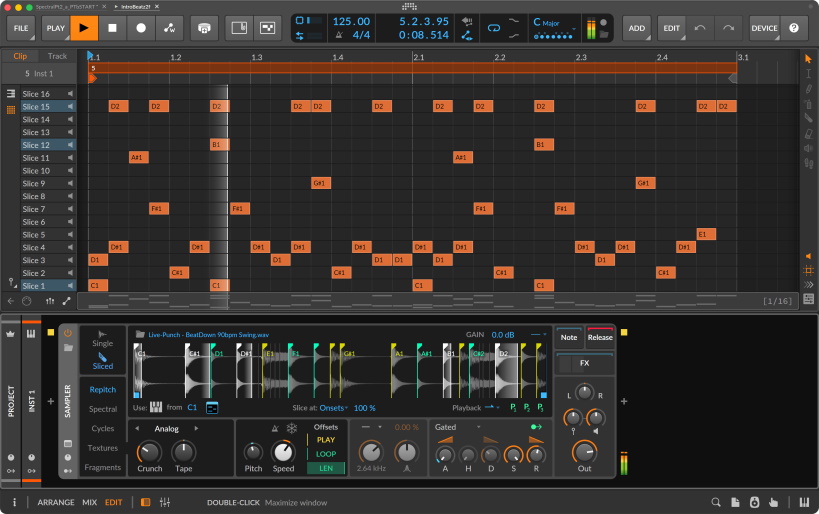
Bitwig announces Bitwig Studio 6.1, featuring a radically updated Sampler. Now in public beta, the new Sampler features quick, versatile slicing with advanced functions. It also offers two new play modes – the time-stretching Spectral and the granular Fragments – and major additions to existing modes, including authentic hardware emulation. Automatic tempo and pitch detection revolutionize old workflows and introduce new ones. And there are many more upgrades across the device, including improved multisample editing, a new Bell filter, and an updated interface with new playhead visualizations.
The updated Sampler makes all audio playable – and ready to color, explore, and perform. It also invites users to sample in ways that weren’t possible before, with unique and powerful features such as looping slices and modulation per slice, harmonic “bending,” synth-like play modes, innovative granular playback options, and more. Bitwig’s Sampler now also offers slicing in all play modes. Clicking the Sliced icon instantly converts a sample into slices that can be triggered from a MIDI controller or the piano roll. Clips can also be sliced from the Arranger or Launcher directly into a Sampler.
Slices can be distributed across a sample in equal divisions or at beat intervals. They can also be placed at onsets (good for rhythmic material) or at pitch changes (using Sampler’s new automatic pitch detection). Whatever the mode, all slices can be manually adjusted, created, and deleted with a click or two. Once sliced, a sample is split into chunks that are triggered by an input. Slices can be triggered via notes (all notes, or just the white/black keys on a keyboard). Alternatively, they can be targeted with the Select control for manual exploration (or for control via automation or modulation) – or via note velocity, for new expressive options.
Additional features give slicing in Bitwig’s Sampler unique creative potential. Per-slice looping can be used to create complex bouncing textures and granular layers. And per-slice modulation means that any parameter in Sampler (or nested devices) can behave differently for each slice, blurring the lines between a sampler and a step sequencer.
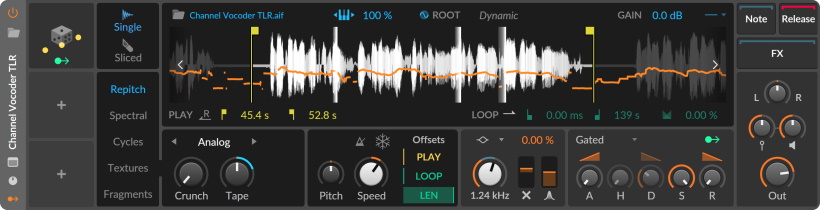
Working with a sample traditionally starts with setting a Root Key, aligning its pitch with the notes on the keyboard. Sampler lets the user manually define a root, but it also revolutionizes this process with dynamic pitch analysis. Clicking the orb icon creates an analysis of the sample. Now the entire sample will dynamically match whatever pitch is played.
Pitch analysis works in all play modes and with slicing and multisample modes. As well as speeding up workflows, this presents exciting new possibilities. In Repitch mode, Sampler will dynamically speed up or slow down through the sample to match the played notes, for a whole new take on auto-tune. Whatever the mode, all kinds of material can become playable melodies and chords.
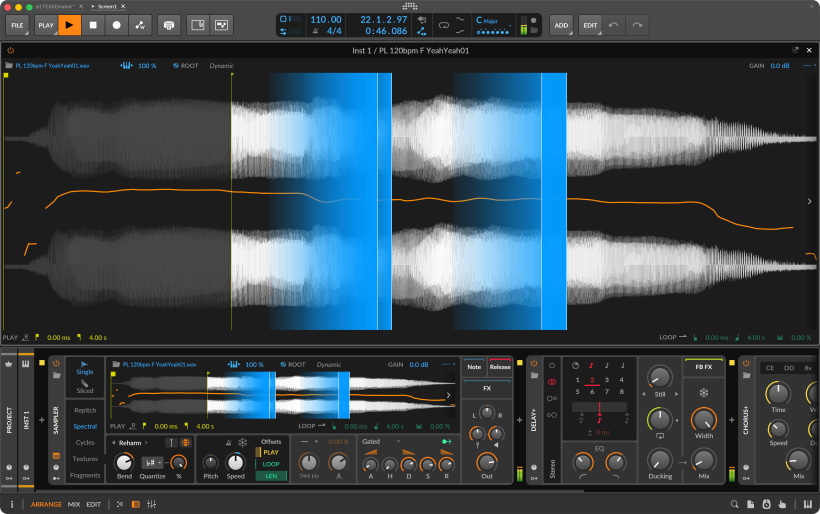
In traditional sample playback, time and pitch are connected: the faster the playback, the higher the pitch. Time-stretching algorithms break this rule, letting you change the speed of a sample while preserving its pitch. We looked closely at the many ways to time-stretch, then came up with our own, optimized for real-time use. Sampler’s Spectral play mode is designed to provide the cleanest possible time-stretching, and open a vast space for sonic exploration.
Spectral excels at preserving a sample when playback speed is changed. With Preserve Onsets engaged, it additionally “unstretches” the sample around transients to preserve punch and character. When combined with Sampler’s automatic tempo detection – and the option to link playback to the project tempo – Spectral makes it easy to bring samples in time. Spectral can also do wild things to timbre. Optional formant processing can morph a sample in ways subtle or uncanny. And Bend can retune its harmonics, with options to quantize them to the nearest octave, or even the project key signature.
Spectral is just one of Sampler’s expanded collection of play modes. Joining it is Fragments, a new mode for advanced granular playback. Generating up to 256 independent grains per voice – with each grain having its own playback rate and direction, position, and size – Fragments is a mighty tool for precise and unusual grain-shaping. With Fragments, dramatic clouds of sound are just the beginning. When playback is slowed down, grains can be treated like an oscillator. Complex textures can be created with the random Motion setting, and variable grain playback direction. Grain envelopes can be shaped from smooth to sharp, and grains can be synced to the project tempo for rhythmic effects. An additional Repeats control causes grains to recur up to 16 times for massive density.
The classic Repitch mode now features two new characters that emulate hardware sounds. Analog brings saturation and tape flavor, while Digital can emulate iconic ‘90s samplers, or mangle sounds beyond recognition. And because Sampler is polyphonic, this processing can be applied differently per-voice, going beyond traditional hardware processing.
Also upgraded, Cycles mode now unites sampling and synthesis. Three new characters can adjust the pulse width of a sample, rebalance its odd and even harmonics, or apply phase modulation. With Freeze engaged, Sampler becomes an oscillator with vast timbral range, and the new Duophonic option crossfades two Cycles engines for a smoother sound.
All Sampler updates are also available in the Sampler module in Bitwig’s sound design environment, The Grid. That means slicing, the new play modes, and all other features can be combined with 230+ modules for near-infinite creative possibilities.
Some additional Sampler features are available only in The Grid. In Fragments mode, grains can be triggered via signal input. And optional module outputs give users access to Sampler’s analysis data. This enables powerful extensions of sampling, such as triggering drum sounds with synced onsets, matching an oscillator to a sample’s moving pitch, or layering sounds using amplitude data.
The new Sampler features plenty more upgrades across the device, including:
- Playhead visualizations have been improved.
- Edits can snap to onsets for quick adjustments.
- New looping options determine what happens when a note is released.
- The new Bell filter is useful for quick tone-shaping of each voice.
There are also many improvements to multisample functionality, including:
- Dragging multiple samples onto a track instantly creates a round-robin Sampler.
- Dragging multiple samples with a modifier layers the samples and automatically tunes them.
- Zones can be muted and soloed for easy editing.
- With multiple zones selected, their values can be quickly edited using the Histogram.
- Live Select Updating can crossfade between samples via pressure, modulator, or other inputs.
Bitwig’s new pitch detection algorithm also appears in Tuner, a handy new analyzer in both the device realm and The Grid.
Essentials - Bitwig Studio’s fundamental sound package available to all users - has been updated with presets that put the new Sampler through its paces. Slicing and time-stretching, granular experiments, Poly Grid patches, and more. Users can update the package from inside the app, and search “6.1” in the Browser to find the new presets. Beta testing of Bitwig Studio 6.1 has started today. The beta is free to all Bitwig Studio, Producer, and Essentials users with an active Upgrade Plan as of June 18. Users will find the beta installers in their user profile. We plan to release Bitwig Studio 6.1 in the summer. The updated Sampler and the new Tuner are available in all Bitwig editions. Sampler’s new Spectral and Fragments play modes are only available in the full version of Bitwig Studio.
The Bitwig Summer Sale is now on, with all editions of Bitwig Studio discounted by 25% – plus a special offer including Bitwig Connect.
- Bitwig Studio 299 EUR
- Bitwig Studio Producer 149 EUR
- Bitwig Studio Essentials 75 EUR
- Bitwig Connect + Bitwig Studio Producer 499 EUR