 How to resolve AdBlock issue?
 Articulign GridVista
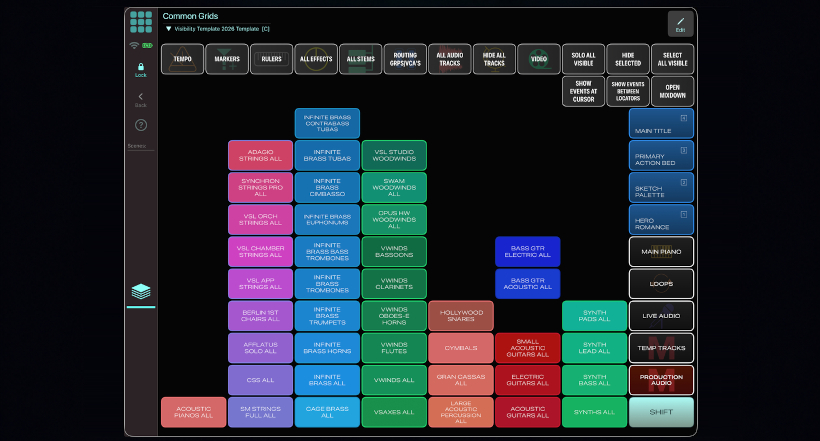
Articulign today announced GridVista, a macOS application that analyzes Cubase and Nuendo projects and generates a personalized MetaGrid Pro control surface for navigating them from an iPad. It gives composers access to instruments, libraries, sections, and custom scoring palettes without searching through hundreds of tracks. Created by composer, producer, and longtime MetaGrid Pro user Richard F.W. Davis, GridVista builds the layout around the user's own template. MetaGrid Pro provides the iPad platform for recalling groups and scenes and customizing the generated workspace.
Large templates give composers an extensive palette, but finding the right instrument can interrupt the writing process. GridVista organizes tracks into visibility groups assigned to buttons in MetaGrid Pro. A composer can reveal a string section, the flutes from a particular library, or a combination of instruments assembled for a specific cue, even when those tracks sit in different project folders. "It strips away the list metaphor," Davis explains. "It doesn't matter where anything is in your template. You can make groups of anything and see any combination of anything."
GridVista imports Cubase and Nuendo project files and analyzes their track names and types. Users can build groups manually or use Auto-Analyze to identify libraries and instruments, then arrange those groups into categories and choose a layout and visual theme.
GridVista generates the MetaGrid Pro grid, Project Logical Presets, and MIDI Remote needed to control track visibility. The completed grid is sent to MetaGrid Pro on the user's iPad, where it can be incorporated into an existing workspace and customized further. Saved setups retain groups, categories, Scenes, layout, and appearance for future use. An optional track-renaming workflow uses the included Lio utility and custom scripting to rename tracks in a copy of the sequence template.
Scenes collect instruments that belong together musically, even when they span different libraries and sections. Cello, felt piano, muted strings, and a sound-design element for a recurring theme can become a single Scene, ready to recall from one button. Generated grids also provide controls for selecting, hiding, enabling, record-enabling, soloing, and muting visible tracks. Sketch piano, production audio, temp tracks, live recordings, loops, and effects returns can remain close at hand. The same approach can support production and mixing templates, including groups of recording chains, buses, and effects channels.
MetaGrid Pro provides customizable iPad workspaces containing buttons, macros, faders, gesture pads, XY controllers, and other controls. GridVista adds a way to generate template navigation and remote controls within that environment. Composers can use the generated workspace as a starting point and continue adapting it in MetaGrid Pro around their own working habits.
GridVista is available for macOS 14 or later. Windows is not currently supported. GridVista requires MetaGrid Pro 1.7.5 or later on the iPad and MetaServer for Mac 6.1.5 or later. GridVista supports Cubase/Nuendo 14.x and later, with version 15.0.30 or later strongly recommended for some features. Its generated layouts were designed around a 12.9-inch iPad. Purchase GridVista in MetaGrid Pro: open Presets, search for GridVista, and purchase the integration. Then open Integrations > GridVista in MetaServer on the Mac to download the companion application.